


Every card nerd has a spreadsheet phase. Mine lasted years.
It started innocently. My credit report kept growing (welcome bonuses are a slippery slope, long story) and I needed one place to see everything. So I opened a Google Sheet, made a row for every card, and felt very organized about it.
And honestly? It worked. For a while.
What I tracked in my credit card spreadsheet
If you want to build your own, these are the columns that actually earned their spot:
- Card name and last 4 digits, because two cards from the same bank look identical after a while
- Credit limit
- Current balance, updated by hand
- Statement date and due date
- APR
- 0% APR end date, the most important column on the whole sheet
- Balance transfer deadline and fee, if I had one going
- Annual fee and the month it posts
- Utilization, a simple formula: balance divided by limit
That's it. Anything more and you stop updating it, which is the real enemy of every spreadsheet.
Here's what mine actually looked like by the end (balances, limits and names blurred, for obvious reasons):
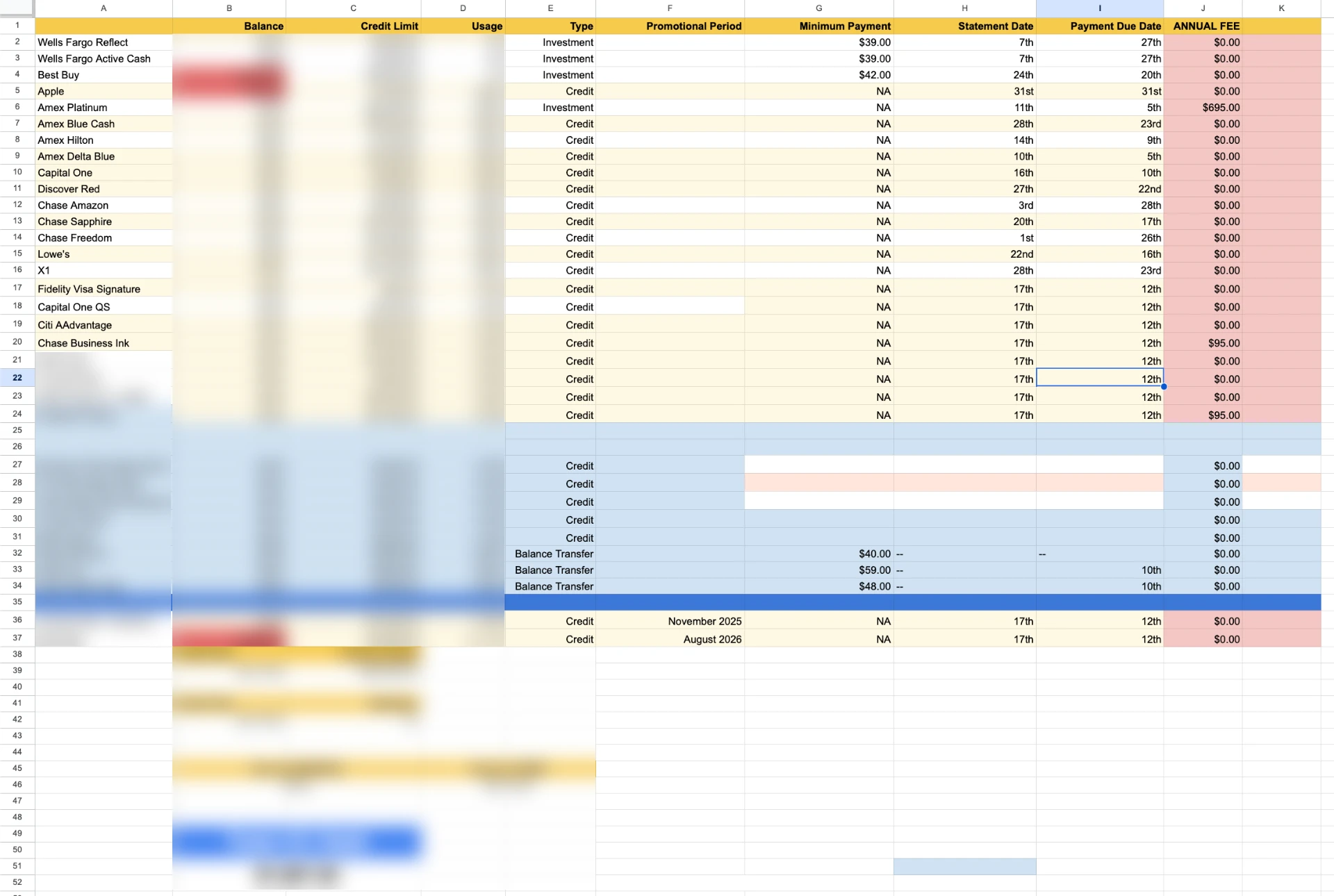
Want a copy of my spreadsheet? Email cardinatesupport@gmail.com and I'll send it your way.
When a spreadsheet is totally fine
I'll be straight with you. If you have 2 or 3 cards, you pay them in full every month, and nothing has a 0% deadline coming up, a spreadsheet (or even a note on your phone) is plenty. You don't need an app for that, and anyone telling you otherwise is selling something. Yes, I see the irony haha.
Where my spreadsheet broke
For me it broke slowly, then all at once.
The updating never ends. Every month I'd log into 10+ bank accounts and copy balances over by hand. Miss a month and the whole sheet turns into a guess.
It can't tap you on the shoulder. A spreadsheet knows your 0% APR ends in March. It will not remind you in February. It just sits there being correct while you forget about it. Same with annual fees, which is exactly how a $150 fee snuck up on me.
Transactions are a whole other beast. Once my wife was also using my cards and I wanted every purchase on the card earning the most points, I was tracking transactions too. Transaction here, transaction there, across 10+ accounts, and the sheet went from "organized" to "a part-time job."
The math gets complicated fast. Which card do I pay down first? How much per month to clear a 0% balance before the rate jumps? You can build formulas for that, but every new card means rebuilding them.
Spreadsheet vs app: the honest version
| Spreadsheet | App like Cardinate | |
|---|---|---|
| Cost | Free | Free for manual tracking, paid for bank sync |
| Setup | You build it | Add cards and go |
| Updating balances | By hand, every month | By hand on Free, automatic with bank sync on Pro |
| Deadline reminders | None unless you set them up yourself | 0% APR, due date and annual fee alerts |
| Payoff plan | Build your own formulas | Avalanche, snowball and promo-first, month by month |
| Flexibility | Unlimited, it's your sheet | Built around credit cards specifically |
The spreadsheet wins on flexibility, no question. The app wins on the boring stuff you'll eventually stop doing.
Why I built Cardinate instead
Cardinate is basically my spreadsheet, if my spreadsheet could remind me of things and do the math for me. Same columns, same obsession, way less copying and pasting. Every card's balance, utilization, due date and 0% APR deadline on one screen.
And if you're not ready to give up the sheet, no judgment. Start with the columns above, update it on the same day every month, and put your 0% end dates in your calendar too. If you ever hit the "part-time job" stage like I did, you can track your cards in Cardinate for free, no bank login needed.
The quick version
- 2 or 3 cards, paid in full, no promos? A spreadsheet is enough.
- Building one? Track limit, balance, statement date, due date, APR, 0% end date and annual fee.
- Juggling deadlines across a lot of cards? That's when reminders and automatic math start paying for themselves.
Frequently asked questions
What should I track in a credit card spreadsheet?
Card name and last 4 digits, credit limit, current balance, statement date, due date, APR, 0% APR end date, any balance transfer deadline and fee, the annual fee and the month it posts, and utilization (balance divided by limit).
Is a spreadsheet good enough to track credit cards?
For a few cards paid in full with no promotional deadlines, yes. It gets harder with many cards because balances must be updated by hand and a spreadsheet will not remind you before a 0% APR or annual fee date.
Can I track credit cards without linking my bank?
Yes. Cardinate's free plan lets you add and track unlimited cards by hand, without connecting a bank account.
Keep going
This post is for general information only and isn't financial, legal or tax advice. I'm not a financial advisor. Card terms, fees and rates change and vary by issuer, so check the details with your card issuer before making a decision.